Splitting does not touch the content. Pages are copied into the new files exactly as they were, so text, images and fonts stay the same. The only decision you make is where each new file ends.
Split PDF
Drop a PDF here
PDF · up to 100 MB per file
Files are deleted after 2 hours. You can delete them right after downloading.
Two ways to split, and when to use each
| Mode | What you get | Good for |
|---|---|---|
| Every page | One PDF per page | A stack of receipts scanned into one file, pulling out single pages |
| After pages… | Consecutive parts, cut after the pages you enter | Chapters, one application packet per person, sending an appendix on its own |
All the parts come in a single ZIP named after your file with -tach added, for example contract-tach.zip.
A cut point is the last page of a part
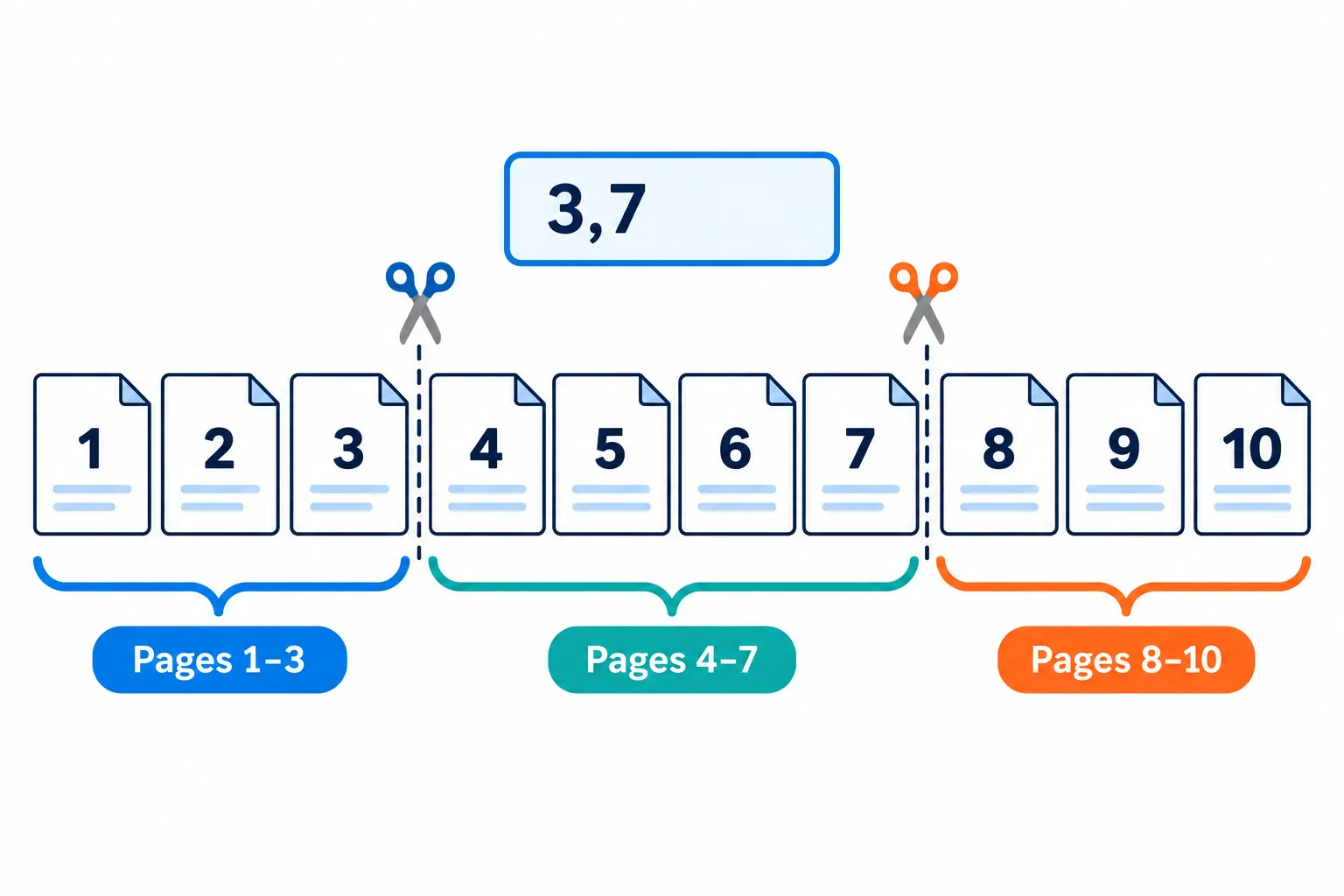
Entering 3,7 cuts right after page 3 and right after page 7.
The numbers you type into After pages… are the last page of each part, not the first page of the next one. Enter 3,7 for a 10-page document and you get three files: pages 1–3, pages 4–7 and pages 8–10. The final part forms on its own, so you never need to type the document's last page.
The classic mistake is using the page number printed on the paper. Many documents have a cover and a table of contents numbered i, ii, iii, so the page printed as "1" may be the fifth page of the PDF. The tool counts the real pages in the file, and the first one is always page 1.
Steps
Open the PDF in any viewer and note the last page of each part from the viewer's page counter (for example 5 / 120), not from the number printed on the page.
Type those numbers in ascending order, separated by commas
`3,7`.
Click Split PDF and download the ZIP.
Open each part and check that its first and last pages are the ones you expected.
When you only need a few pages
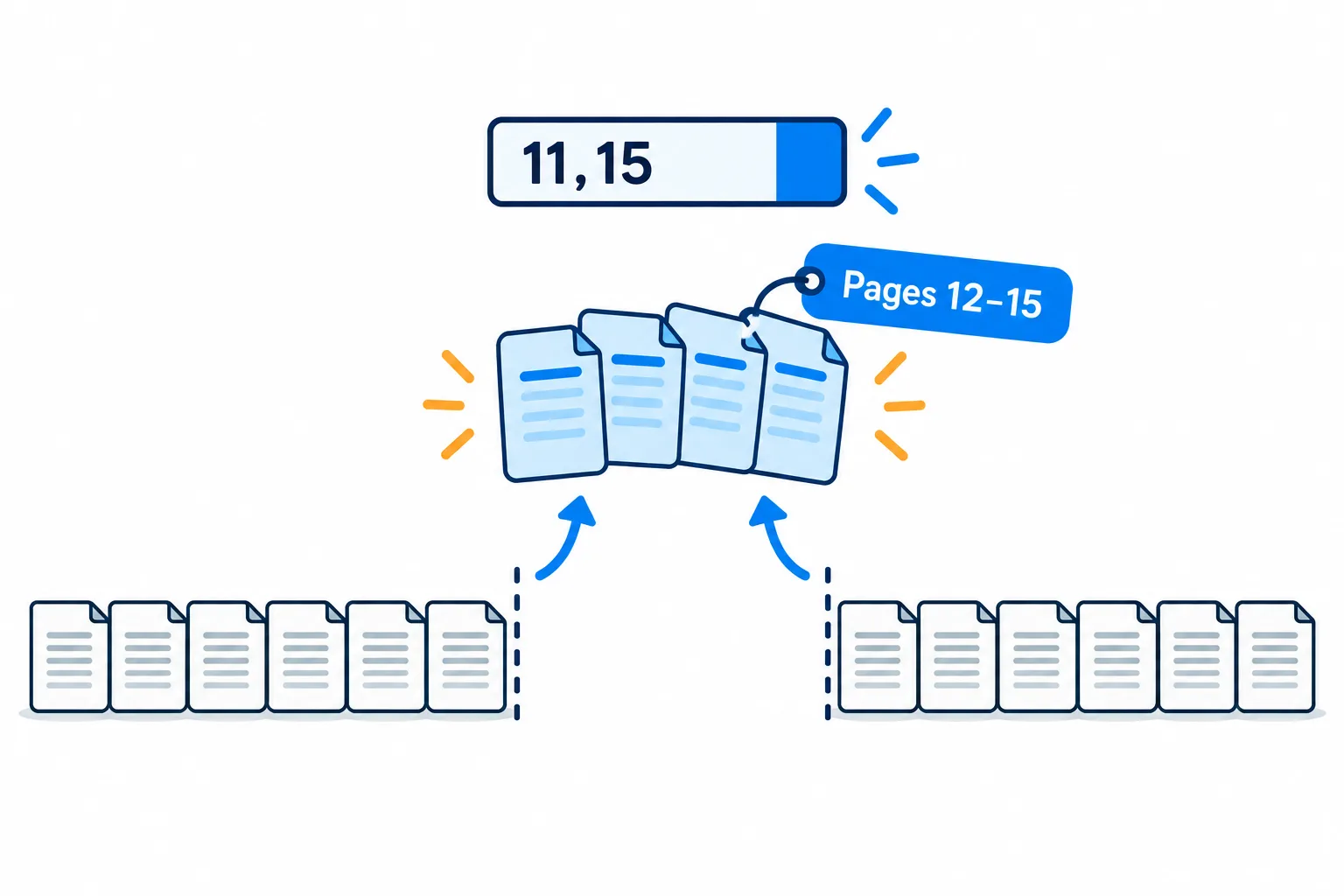
Cut after page 11 and page 15, and the middle file holds exactly pages 12–15.
- One page: choose Every page, open the ZIP and keep the file for that page.
- A run of pages, say 12–15: enter
11,15. You get three files, and the middle one is pages 12–15. - Scattered pages such as 2, 5 and 9 in one file: split every page, then merge the ones you need in order. If you only want to drop a few pages, Delete PDF pages is quicker.
ZIP files can be awkward on a phone. Press Continue and choose Extract archive to download each PDF on its own, without uploading anything again.
When the parts add up to more than the original
That is normal. Each part has to carry the fonts and images its pages use, so anything shared gets copied into several files. If one part is still too heavy to send, compress that PDF on its own.
Frequently asked questions
Does splitting break a digital signature?
Yes. A signature only vouches for the original file as it was signed, so the parts carry no valid signature. Keep the signed original in case someone needs to verify it.
Do links inside the document still work?
Links to websites usually survive. A link that points to a page now sitting in another part has nowhere left to go.
How do I split a password-protected PDF?
Unlock it first with Unlock PDF using the password you have, then press Continue and pick Split PDF.
Are my files kept on the server?
They are deleted after 2 hours, and you can delete them yourself as soon as you have the result.
Try it on your own file
Free, no sign-up. Files are deleted after 2 hours.