Many application portals accept a single PDF, while your paperwork is five or six photos on your phone. Image to PDF puts them together, one image per page. Whether the result looks neat or messy depends on two things: the photos and how they are placed on the page.
Image to PDF
Drop images here
JPG, JPEG, PNG, WEBP, GIF, BMP… · up to 100 MB per file · up to 20 files
Files are deleted after 2 hours. You can delete them right after downloading.
Take clear photos before you combine them
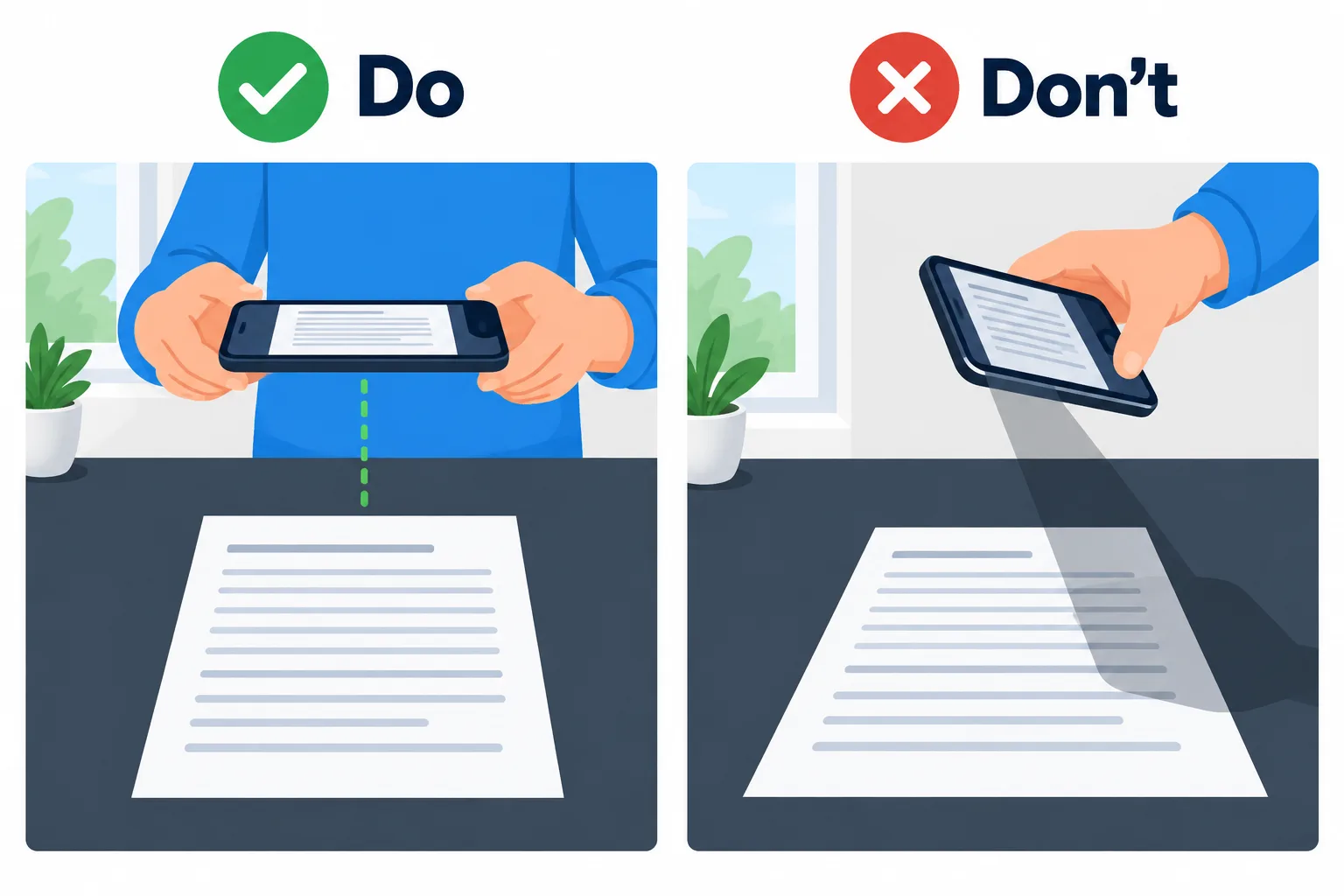
Shoot straight down in even light and the PDF reads like a scan.
The tool cannot make an image better than the original, so most of the quality is decided when you take the picture.
- Lay the paper on a flat, dark surface so its edges stand out from the background.
- Shoot straight down, with the phone parallel to the paper. An angled shot turns the lines of text into a trapezoid.
- Use even light; next to a window is best. Ceiling lights tend to cast the phone's own shadow on the page.
- Let the page fill most of the frame. Trim the leftover background with Crop image before combining.
Three ways to place an image on the page
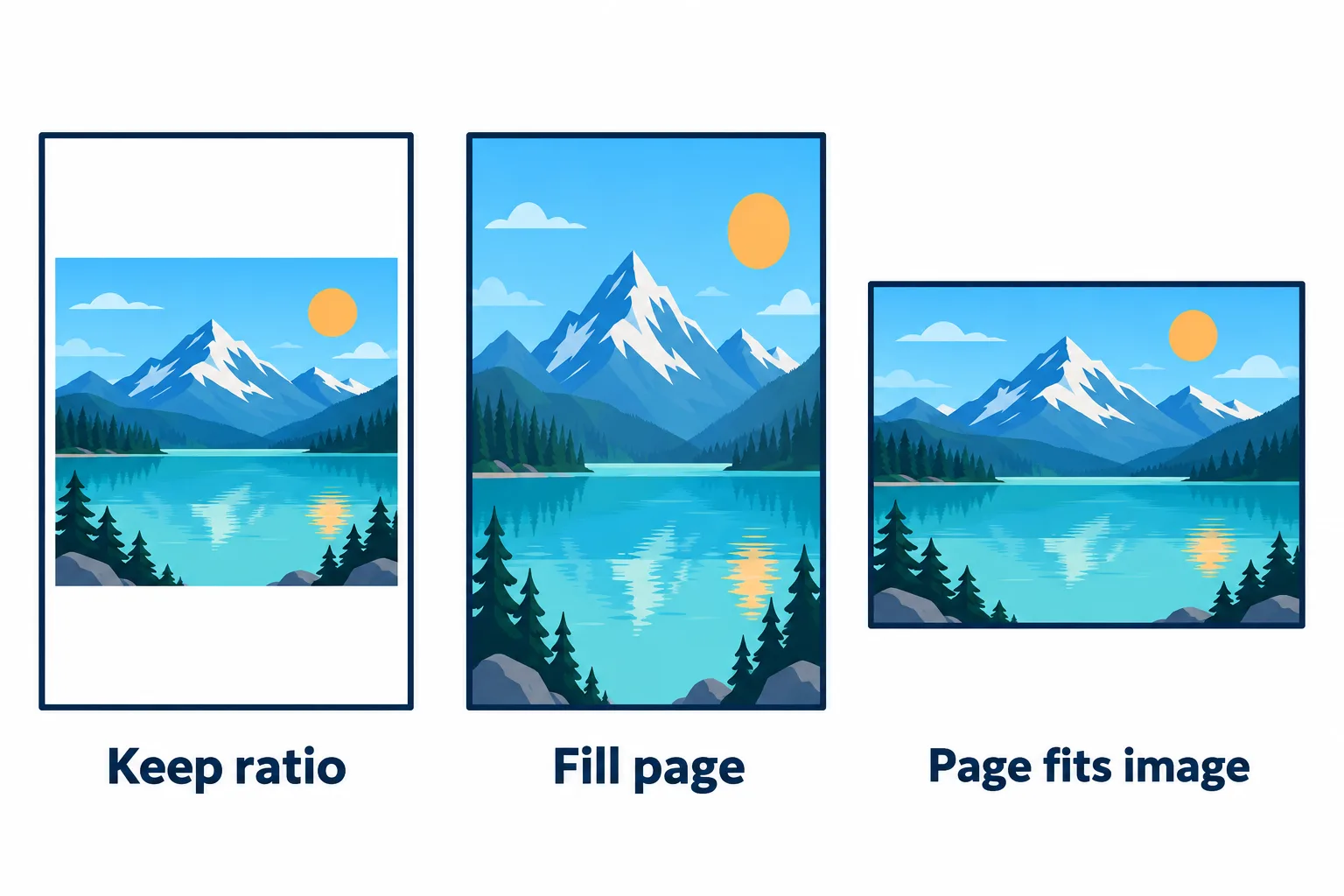
One photo, three modes: white margins, stretched, and a page cut to the photo.
| Mode | PDF page | Image on the page | Good for |
|---|---|---|---|
| Keep ratio (default) | A4 | Fits inside the page, never distorted, may leave white margins | Documents to print or submit as A4 |
| Fill page | A4 | Stretched to cover the page, may be distorted | Photos of A4 paper cropped to the edges |
| Page fits image | Exactly the image size | No white margins | Screenshots, images meant for screens |
Why does Fill page stretch images? A4 has a ratio of about 1:1.41, while a portrait phone photo is usually 3:4, or 1:1.33. Stretching it to fill an A4 page makes it about 6 % taller. On a document cropped to its edges you will barely notice; on a photo of people or objects it shows.
Get the page order right
Each image becomes one page in list order, and you can drag images to move them. Naming the photos with numbers of equal length, such as 01, 02, … 10, before uploading saves reordering. Each PDF takes up to 20 images; for more, create several files and merge the PDFs.
Keep the front and back of the same document next to each other, front first. Whoever checks your application will not have to flip back and forth.
Make it lighter and searchable
Phone photos weigh a few MB each, so a PDF built from ten of them can exceed an upload limit. Press Continue to compress the PDF without uploading again. The Balanced level is plenty for paperwork.
The text in the photos cannot be searched or copied yet either, because each page is just a picture. If you need that, choose OCR PDF under Continue to recognize Vietnamese or English text.
Frequently asked questions
Can I use HEIC photos from an iPhone?
The tool takes JPG, PNG, WebP, GIF, BMP and TIFF. To make the iPhone camera save JPG instead, go to Settings, Camera, Formats and choose Most Compatible.
What will the PDF be called?
It takes the name of the first image in the list, so `receipt-01.jpg` becomes `receipt-01.pdf`.
Should I compress the images first or the PDF afterwards?
Either works. Compressing the PDF after combining is quickest, because you do it once for the whole file.
Are my images kept on the server?
They are deleted after 2 hours, and you can delete them yourself as soon as you have the result.
Try it on your own file
Free, no sign-up. Files are deleted after 2 hours.