
When you enlarge an image in an ordinary editor, each old pixel is stretched into several, and the new ones are averaged from their neighbours. The picture gets bigger but gains no detail, so it looks soft and smeared. AI upscaling works differently: a model trained on millions of photos predicts and draws in edges, fabric texture and leaves at the new resolution.
Upscale Image
Drop images here
JPG, JPEG, PNG, WEBP, BMP · up to 100 MB per file · up to 5 files
Files are deleted after 2 hours. You can delete them right after downloading.
×2 or ×4, depending on the image
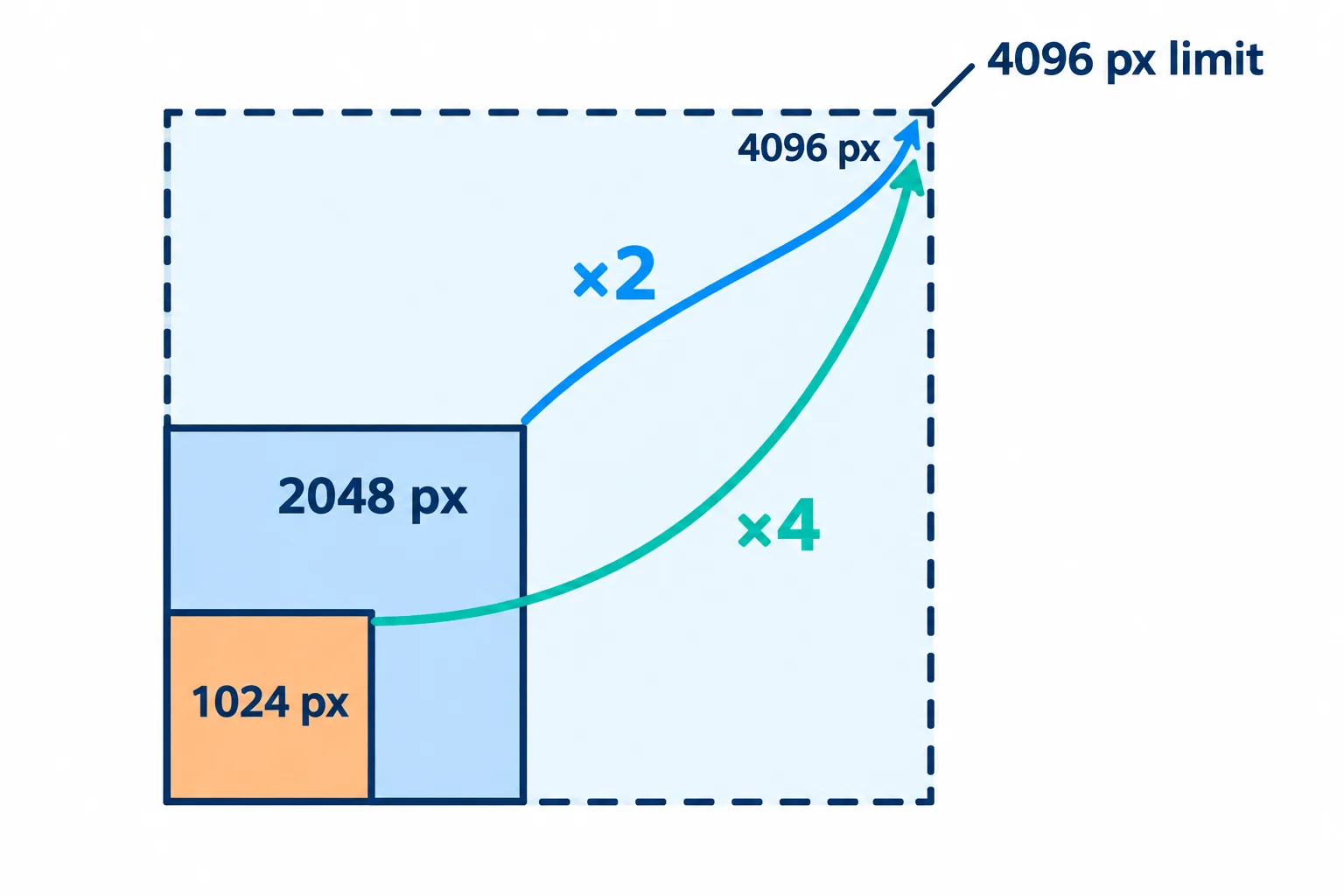
Results top out at 4096 px, so large originals are reduced before upscaling.
Results are at most 4096 px on the long side, so images longer than 2048 px (at ×2) or 1024 px (at ×4) are reduced first and then upscaled.
| Original (long side) | Choose | Result (long side) |
|---|---|---|
| 256–512 px: profile pictures, thumbnails | ×4 | 1024–2048 px |
| About 1000 px: web downloads, photos sent through chat apps | ×4 | About 4000 px |
| 1200–2048 px | ×2 | 2400–4096 px |
| Over 2048 px | ×2, or no upscale at all | 4096 px |
For images already over 2048 px the gain is small, because they are brought down to 2048 px before going up to 4096 px. Images that size are usually sharp enough as they are.
How many pixels a print needs
An easy rule: a good print needs about 300 pixels per inch, or roughly 118 pixels per centimetre.
| Print size | You need about |
|---|---|
| 4 × 6 in (10 × 15 cm) | 1200 × 1800 px |
| 5 × 7 in (13 × 18 cm) | 1500 × 2100 px |
| A4 (8.3 × 11.7 in) | 2480 × 3508 px |
An 800 × 1200 px photo for a 4 × 6 in print needs ×2, which is plenty. For A4, use ×4 and accept that some of the detail is the AI's best guess.
Photos that suit it, and photos that do not
- Good candidates: small but clear images, product shots, illustrations, AI art, screenshots that need to be bigger.
- Poor candidates: photos blurred by camera shake or missed focus, text already too smeared to read. AI sharpens edges; it cannot rebuild detail that is completely gone.
- Old paper prints with scratches, creases or faded colour: Restore Old Photo is the better tool.
Check at 100 % before you use it
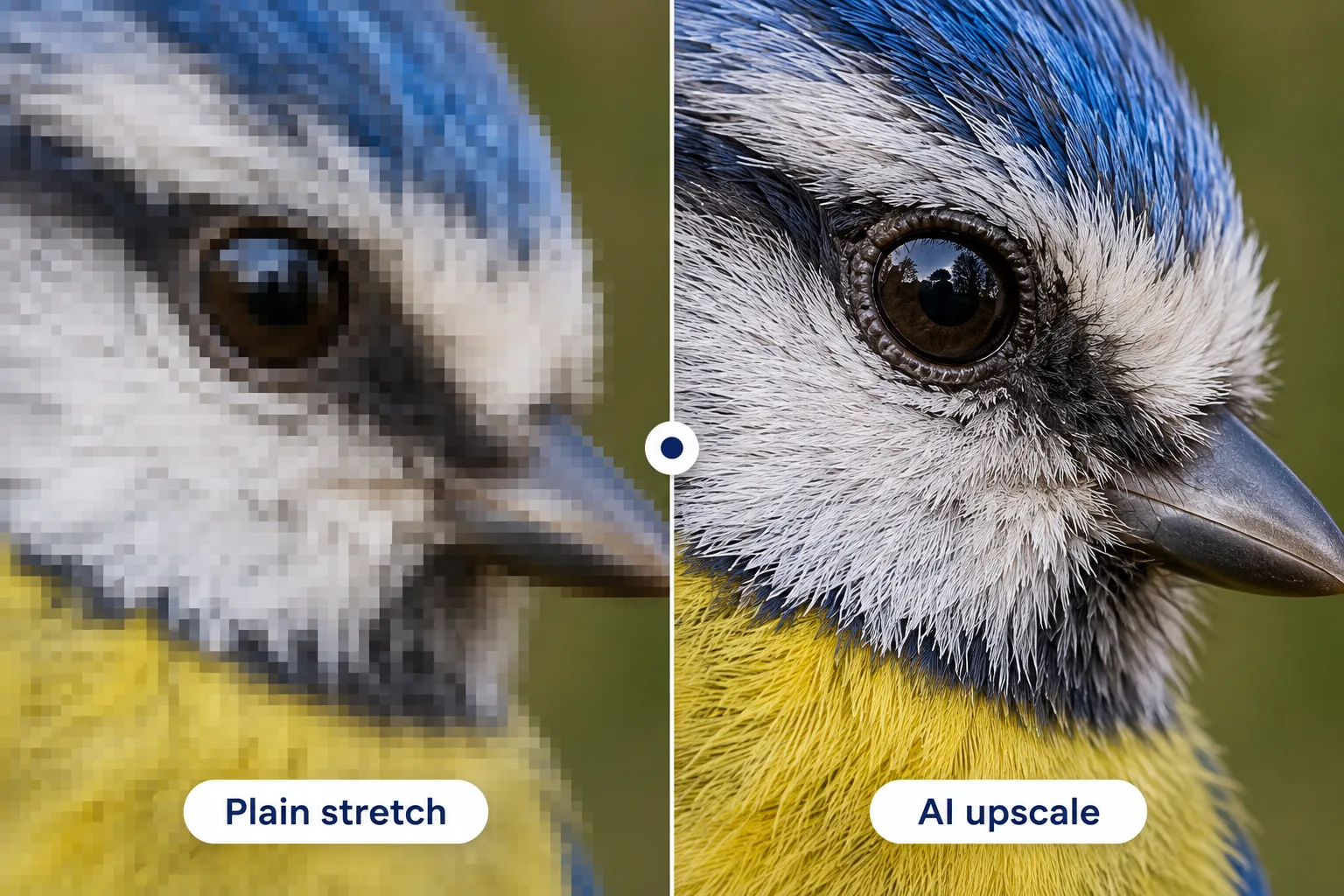
At 100 % the difference shows in the edges and the feather texture.
Press View at 100% and look closely at three things: faces, text, and repeating textures such as hair, grass or brickwork. AI sometimes smooths skin too much or invents patterns that were never in the photo. If something looks off, try ×2 instead of ×4.
For light files on the web, pick JPG or WebP. PNG keeps every detail, but a 4096 px PNG can weigh tens of MB; if needed, compress the image after upscaling.
Frequently asked questions
Is ×2 twice better than ×4 once?
Usually not. Each pass adds detail the AI guessed, so a second pass also enlarges the wrong guesses. One ×4 pass from the original is the cleanest route.
Does upscaling make the file bigger?
Yes, because the pixel count grows 4 times at ×2 and 16 times at ×4. Choose JPG or WebP if you need a lighter file.
How many images can I upscale at once?
Up to 5, taking about 7 seconds each at ×2 and 9 seconds at ×4.
Are my images stored or used to train AI?
No. They are deleted from the server after 2 hours and never used to train AI.
Try it on your own file
Free, no sign-up. Files are deleted after 2 hours.